

What should I do if the bathroom ventilation dryer light is flashing?
What should I do if the bathroom ventilation dryer light is flashing?
If the lamp on your bathroom ventilation dryer is flashing, the corrective action will vary depending on the manufacturer.
Please select the manufacturer of your bathroom ventilation dryer from the list below.
※The manufacturer's name is written on the control panel. If it says "Dry Fan," it's made by Max.
〈Max lamp flashing reset procedure〉
1. Press the "Stop"「停止」 button.
2. If the flashing stops, press the various operation buttons to check their operation.
If the flashing does not stop or the device does not work properly, proceed to step 3. below.
3. Press and hold the reset switch hole on the remote control panel with a thin wire (such as a toothpick).
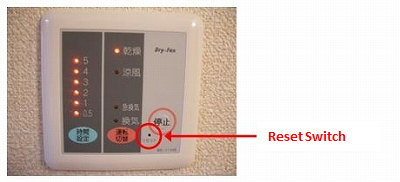
4. When all the operation switch lamps are flashing, press the stop button to turn off all the operation switch lamps.
If the flashing stops, press the various operation buttons to check their operation.
If the flashing does not stop or the device does not work properly, proceed to step 5 below.
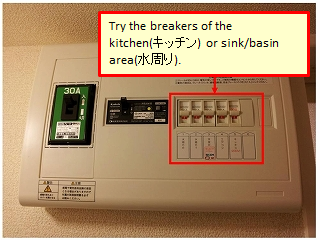
5. Turn off the bathroom ventilation dryer breaker in the indoor distribution panel and wait about 20 seconds.
6. Turn the breaker to "ON" and press the "Stop" 「停止」button.
7. If the flashing stops, press the various operation buttons to check their operation.
If the flashing does not stop or the device does not work properly, repeat steps 5. and 6. above two or three times.
If the problem persists after trying the above, please let us know the manufacturer and model number of your bathroom ventilation dryer, as well as detailed information about the symptoms, using the Equipment Repair Request Form.
〈Procedure when the inspection lamp is lit or flashing〉
After a certain period of time has passed since installation, the inspection lamp will light up or flash.
Even if the inspection lamp lights up or flashes, you can continue to use the product as long as there is no problem.
If you have any problems, please let us know the manufacturer, model number, and detailed symptoms using the "Equipment Repair Request Form"
Please check below for instructions on how to turn off the inspection light.
1.Press the "Stop"「停止」 button to stop the device.
2.Press the "Timer" 「タイマー」button for 10 seconds and the inspection light will turn off when the process is complete.
〈Toshiba lamp flashing reset procedure〉
1. Press the "Stop"「停止」 button.
2. If the flashing stops, press the various operation buttons to check their operation.
If the flashing does not stop or the device does not work properly, proceed to step 3. below.
3. Turn off the bathroom ventilation dryer breaker in the indoor distribution panel and wait about 20 seconds.
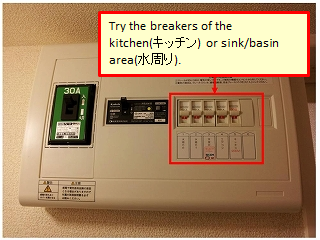
4. Turn the breaker to "ON".
5. If the flashing stops, press the various operation buttons to check their operation.
If the flashing does not stop or the device does not work properly, repeat steps 3. and 4. above two or three times.
If the problem persists after trying the above, please let us know the manufacturer, model number, and detailed symptoms using the Equipment Repair Request Form.
〈Procedure when the inspection lamp is lit or flashing〉
After a certain period of time has passed since installation, the inspection lamp will light up or flash.
Even if the inspection lamp lights up or flashes, you can continue to use the product as long as there is no problem.
If you have any problems, please let us know the manufacturer, model number, and detailed symptoms using the "Equipment Repair Request Form"
Please check below for instructions on how to turn off the inspection light.
1.For models with 24-hour ventilation function, press the "Stop" 「停止」button for more than 3 seconds to stop 24-hour ventilation.
2.Press "Stop" 「停止」and "Cool Air" 「涼風」simultaneously for more than 3 seconds.
3.Press "Off Timer" 「切タイマー」and set it to "1".
4.Click "Stop"「停止」 to finish the setting.
〈Mitsubishi lamp flashing reset procedure〉
1. Press the "Stop"「停止」 button.
2. If the flashing stops, press the various operation buttons to check their operation.
If the flashing does not stop or the device does not work properly, proceed to step 3. below.
3. Turn off the bathroom ventilation dryer breaker in the indoor distribution panel and wait about 20 seconds.
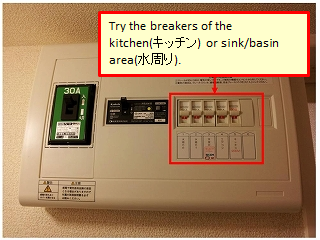
4. Turn the breaker to "ON".
5. If the flashing stops, press the various operation buttons to check their operation.
If the flashing does not stop or the device does not work properly, repeat steps 3. and 4. above two or three times.
If the problem persists after trying the above, please let us know the manufacturer, model number, and detailed symptoms using the Equipment Repair Request Form.
〈Procedure when the inspection lamp is lit or flashing〉
After a certain period of time has passed since installation, the inspection lamp will light up or flash.
Even if the inspection lamp lights up or flashes, you can continue to use the product as long as there is no problem.
If you have any problems, please let us know the manufacturer, model number, and detailed symptoms using the "Equipment Repair Request Form"
Please check below for instructions on how to turn off the inspection light.
1.Press the "Stop" 「停止」button once briefly, then press and hold it for more than 3 seconds to stop operation.
2.Press and hold "Stop" 「停止」and "Reset" 「リセット」for at least 6 seconds to enter release mode.
3.Press and hold only the "Reset" 「リセット」button again for at least 6 seconds to turn off the notification light.
4.Press "Stop" 「停止」and if the inspection light is off, the process is complete.