

How to register the "Existing damages report" document when entering the room.
How to register the "Existing damages report" document when entering the room.
The tenants are able to file an "pre-existing damage report" [入居時損傷箇所確認届]document to register the damages that are already in the room if they do not have an smartphone or that lives in a building without support for the LEONET device.
※If you have an smartphone (iPhone or Android), check how to register it through the &LEO app.
※When filing the document instead of the app, please mail or hand it to a LeoPalace branch.
※If you are sending the document by mail, a letter stamp will be required (110 yen seal stamp) and must be addressed to the local management center. (If you are not sure regarding the management center address, send it to the closest LeoPalace branch.)
※If you do not have the damage report document 「入居時損傷箇所確認届」 given with the contract of the room, you can print the file attached bellow.
※There is no confirmation receipt when filing the details, be sure to make a copy of the filed information on the document and keep for confirmation if necessary later.
※Even after filing the details, if it's still within the first month of the contract, you still can report additional content. In this case, use the &LEO app.
●Detail on the information filled:
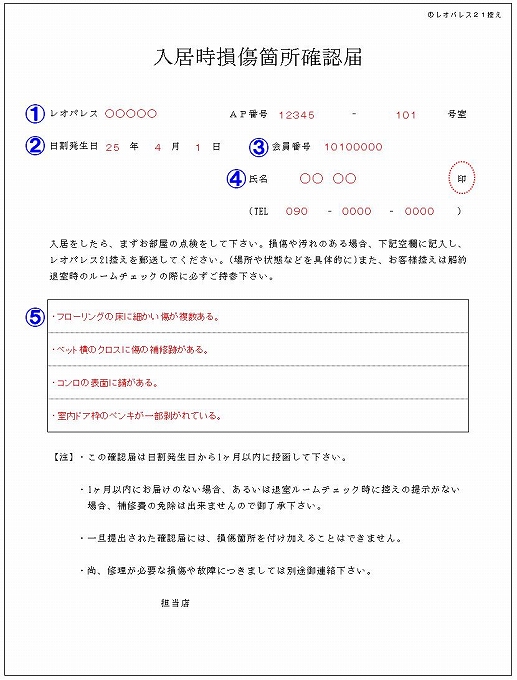
① File the name, AP/building number/code and room number.
※If you don't know your building/AP number/code, click here.
② File the date your contract starts (the day the rent calculation starts).
※You can only register the notice within the first month the contract starts.
③ File your customer number (contract number).
※Click here if you do not know your contract (customer) number.
④ File your name (contractor's name) and contact number, then stamp with your hanko (family stamp).
※If you are using the room through your company contract, you may file the tenant and the company name and stamp the tenant name (the company's stamp is not necessary).
⑤ File the details of the damages or stains you want to report.
※You may also add pictures to the report.
For equipment that needs to be repaired to be used, file a maintenance request through our『Inquiry Form』 instead.
Attached File:
・Existing damage report - 入居時損傷箇所確認届.pdf (55.86 KB)