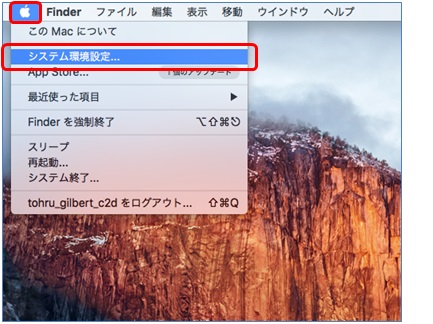
1.Select [System configuration] from [Apple menu].
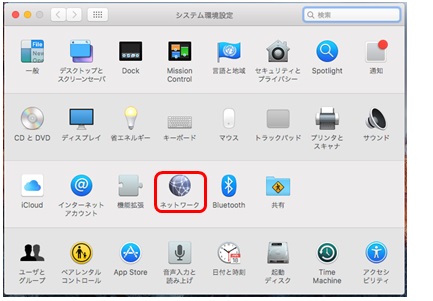
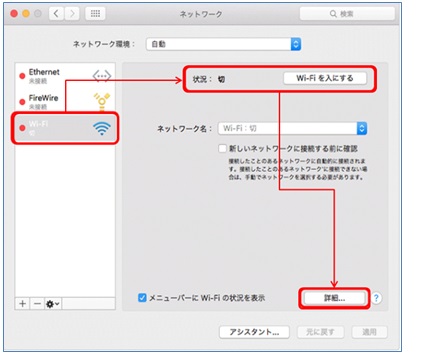
3.Select [Wi-Fi] from [Network] on the left side of the screen.
Click [Wi-Fiを入にする(On)] if [状況/Status] is set to [切/Off], and click [詳細/Detail].
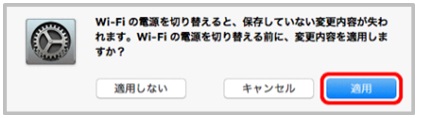
(※If you see the screen as below, click 「適用(apply)」.
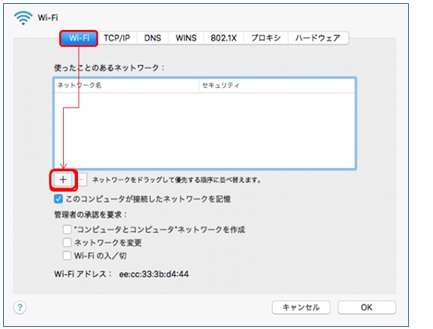
4.The wireless setting screen is displayed. Select [+], then Network enter screen will be displayed.
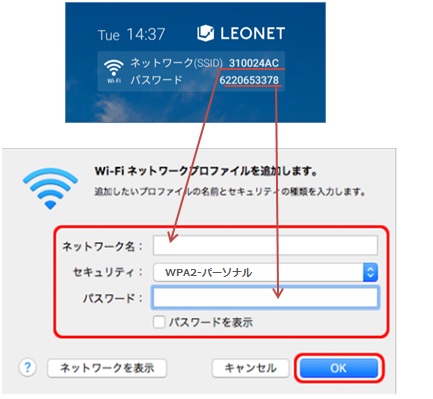
5.Enter and select network information. (Please confirm the right top corner of LEONET top page on the TV) .
Network name: Enter SSID displayed on the screen.
Security type: Select 「WPA2-パーソナル」(WPA2-personal).
Security key: Enter password displayed on the screen.
Setting is completed.
Customers who have subscribed to the Standard Plan, Basic Plan, or Light Plan are provided with secure setup support.