

How to setup the multi (universal) remote controller for the air conditioner.
How to setup the multi (universal) remote controller for the air conditioner.
Some of our buildings have multi (universal) remote controllers for the air conditioner.
Multi (universal) remote controllers can be used for most air conditioners manufactures (brands/companies) .
※If the maker/brand of the air conditioner is the same written on the controller, the controller will be the original one and not an universal controller.
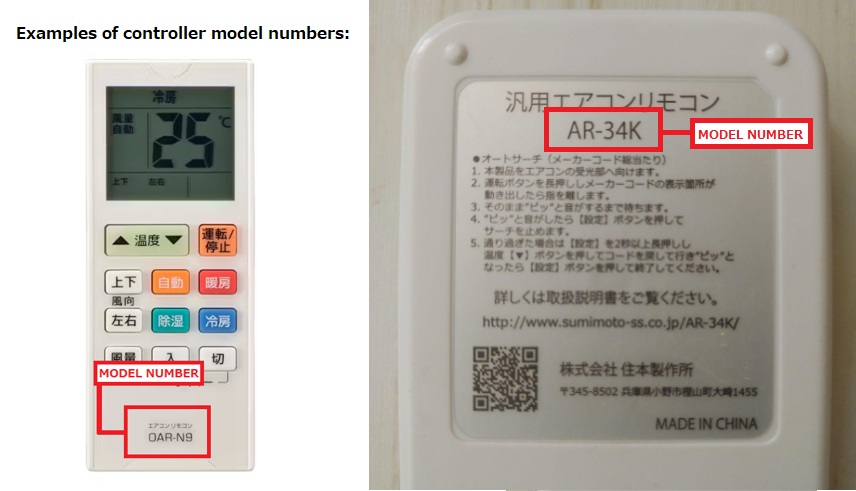
Check the model of the controller:
The universal controller will have a model number and you need to confirm it to check the settings.
*The model may be written on the front or the back depending on the controller.
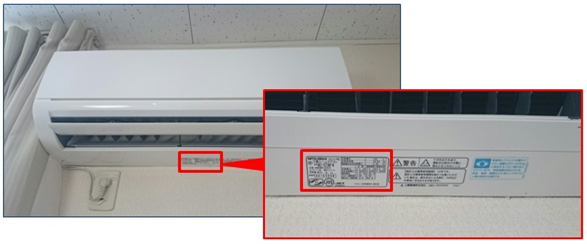
Check the maker / manufacturer / brand of the air conditioner:
After confirming the model of the controller, confirm the maker of the air conditioner and look for the code used on the controller.
The maker of the air conditioner will be one of the major companies, [Toshiba, Panasonic/National, Haier, Sharp, Daikin, Fujitsu (General), LG Electronics, Hitachi, Sanyo, Corona, Mitsubishi Electronics, Mitsubishi Heavy Industries (Beaver)].
【Multi (Universal) controller setting】
※Select the model of your controller on the list to check the setting instructions:
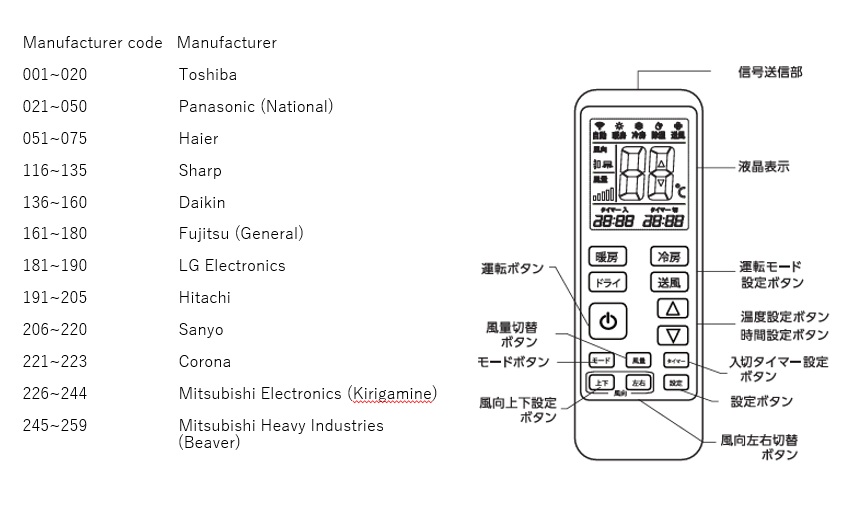
(You can check the list at the bottom of the page for the code of all manufacturers for each controller.)
*Controllers from the same manufacturer have similar setting methods. If your controller is not listed, try the configuration of a closer model from the same brand.
Attached Files:
・ Setting Code list for AC Manufacturer/Brand.pdf (~536 KB)
List of universal controller models that starts with the letter [ A ]
Setting for the AR32-E/AR33-E controller:
● Automatic setting (For all manufacturer codes):
※Turn off the air conditioner unit before starting the configuration.
① Point the controller towards the air conditioner unit.
② Hold down the Setting 【設定】 button. (The code searching begin after about 5 seconds.)
③ The code number will start from "000" until the last code number available.Release the Setting 【設定】 button when you see the main unit starts operating.※ If you were late to release the Setting 【設定】 button, you can return to the correct number with the temperature arrow【温度▼ / ▲】 buttons.
④ When you are at the correct number, press 【設定】 button again and the setting is complete.
● Manual setting:
※Turn off the air conditioner unit before starting the configuration.
① Hold down the Setting【設定】 button for around 2 seconds and release (you can see 3 digits number on the bottom right of the display blinking).
② Please set manufacturer code for your air conditioner, checking the list with the temperature arrows【温度▲】 and 【温度▼】 buttons.
Setting Code list for AC Manufacturer/Brand.pdf
③ Test if the main unit is operating with the code, then press 【設定】 button to finish.
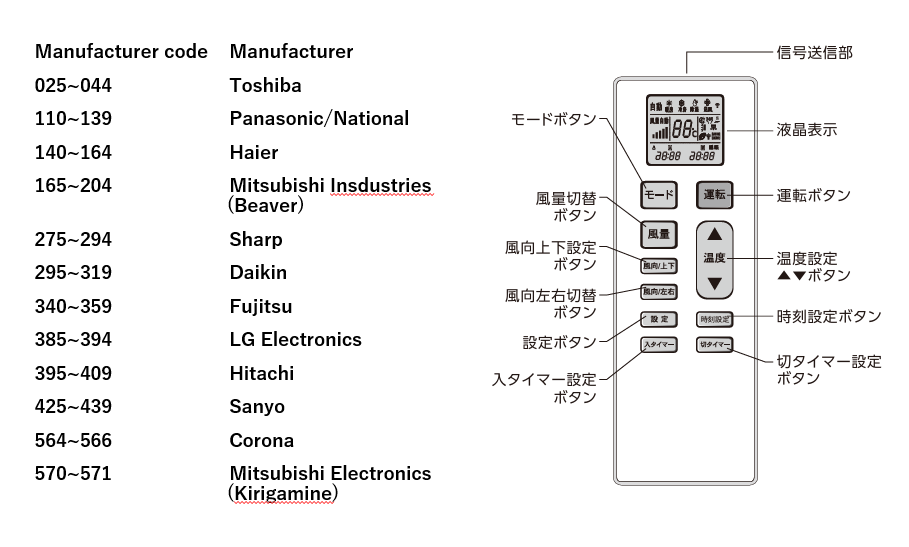
Setting for the AR34K controller
● Automatic setting (For all manufacturer codes):
※Turn off the air conditioner unit before starting the configuration.
① Point the controller towards the air conditioner unit.
② Hold down the green ON/OFF 【運転 button】until the setting code starts to count up on the display and release.
③ Wait until you hear a beeping sound from the air conditioner unit.
④ When you hear the beep, press the Setting button 【設定 button】 to stop on the number.※ If you were late to press the Setting 【設定】 button, you can return to the correct number with the temperature arrow【温度▼ / ▲】 buttons.
● Manual setting:
※Turn off the air conditioner unit before starting the configuration.
① Hold down the Setting【設定】 button for around 2 seconds and release (you can see 3 digits number on the bottom right of the display blinking).
※ Be careful to not hold it for more than 5 seconds, otherwise it will start to set time instead.
② Please set manufacturer code for your air conditioner, checking the list with the temperature arrows【温度▲】 and 【温度▼】 buttons.
Setting Code list for AC Manufacturer/Brand.pdf
③ Test if the main unit is operating with the code, then press 【設定】 button to finish.
Setting for the AAR-202 controller
● Automatic setting (For all manufacturer codes):
※Turn off the air conditioner unit before starting the configuration.
① Point the controller towards the air conditioner unit.
② Hold down the Setting【設定】 and Power【電源】 buttons for 4 seconds.
③ The temperature display will turn to "00". (There might be other numbers on the display, but it is not malfunction.) A transmission icon will be displayed.
④ Release the buttons once the transmission icon appears.
⑤ The automatic search will start as the transmission icon blinks. (Once every 3 seconds)
⑥ When the main unit responds to the code and turns on, press any button on the remote to stop the counting. The transmission icon will disappear and the setting is completed.
● Manual setting:
※Turn off the air conditioner unit before starting the configuration.
① Hold down the Setting 【設定】 button for 2 seconds.
② The temperature display will turn to "00". (There might be other numbers on the display, but it is not malfunction.)
③ While you are holding down the Setting【設定】 button, set the manufacturer code from the list with the temperature arrows【温度▲】 and 【温度▼】 buttons.
Setting Code list for AC Manufacturer/Brand.pdf
④ Release the buttons when you set the desired code and check if the unit responds.
Setting for the ACR-300YD controller
● Setting instructions:
※Turn off the air conditioner unit before starting the configuration.
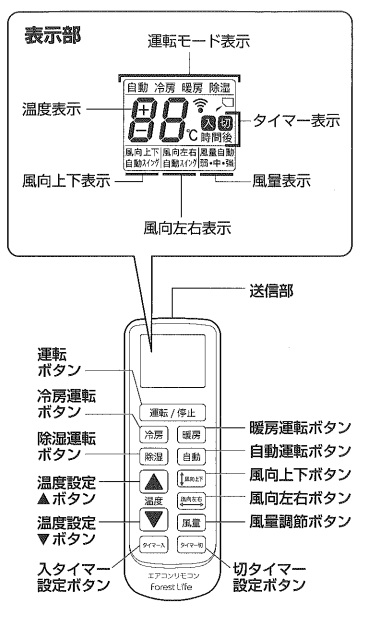
① While holding down the power button [ 運転/停止 ] press the mode button corresponding to the manufacturer for the setting.
[Power buton 運転/停止]+[Cold air mode button 冷房] Daikin / Sharp / Chofu
[Power buton 運転/停止]+[Hot air mdoe button 暖房] Panasonic (National) / Sanyo / Hitachi
[Power buton 運転/停止]+[Dry air mode button 除湿] Toshiba / Fujitsu General / Funai / Corona / LG Electronics
[Power buton 運転/停止]+[Auto mode button 自動] Mitsubishi / Mitsubishi Juko (Beaver) / Fifty (Forest Life)
②The number can be changed by pressing the temperature buttons『▲▼』 while is blinking.
③Push the power button [ 運転/停止 ] towards the air conditioner and check whether the air conditioner works.
Setting Code list for AC Manufacturer/Brand.pdf
※Check the code using the "Manufacturer code list"
※If there is no operation for 30 seconds, the setting will be finished automatically, in this case please set again.
Setting for the K-1028E controller
● Setting instructions:
※Turn off the air conditioner unit before starting the configuration.
①Find a code responding to the air conditioner from the manufacturer code list.
Setting Code list for AC Manufacturer/Brand.pdf
②Please make sure the air conditioner is turned off.
③Hold down『SET』 button pointing the remote to the air conditioner until 3 digit number flashes in the screen.
④Press the temperature buttons 【▲▼】 to set a manufacture code within the range of code found in ①.⑤The power will be turned on when its code is set correctly.
※Please try another code if the air conditioner doesn't turn on.
⑥Press 『SET』 button, then setting is complete.
Setting for the EL1901 controller
● Manual setting:
※Turn off the air conditioner unit before starting the configuration.
※Please try with automatic setting if you are not sure about the manufacturer code or it doesn't work properly.
①Check the code corresponding to the air conditioner from the list of manufacturer codes.
Setting Code list for AC Manufacturer/Brand.pdf
②Please turn off the air conditioner.
③Point the remote at the air conditioner, press and hold the [SET] button until a 3 digits code displays.
④The number can be changed by pressing the temperature buttons『▲▼』, so please change to the code you've found at ①.
⑤The unit will respond when it finds a corresponding code.
※It would respond in multiple numbers, so please try more functions like power, mode, wind intensity, timer etc.
⑥Press the "OK" button to complete.
● Automatic setting (For all manufacturer codes):
※Turn off the air conditioner unit before starting the configuration.
①Turn off the air conditioner.
②Point the remote at the air conditioner, press and hold the 『SET』 button until a 3 digits code displays.
③Press the 『SET』 button once again.
④The 3 digits number right down corner on the screen starts moving.(Count up)
⑤Select the 2 digits code by pressing the temperaturer buttons.
※If you cannot use the number you've remembered, please try again with 3~5 in the sequence number.
※Multiple numbers are prepared for each manufacturers, so the number would be different depending on the manufacturing date and model.
⑥The number can be changed by pressing the temperature buttons『▲▼』, so please change to the code you've remembered in ⑤.
⑦Press the "OK" button to complete.
List of universal controller models that starts with the letter [ O ]
Setting for the OAR-N13(BK13) controller
● Setting instructions:
※Turn off the air conditioner unit before starting the configuration.
①Holding down the power button [ 運転/停止 ] then press the button corresponding to the manufacturer for the setting (cooling 冷房/heat暖房 / dehumidifying 除湿/automatic自動)
[ Power button運転/停止 ] +[dehumidifying 除湿 ] Panasonic (National) / Sanyo / Hitachi
[ Power button運転/停止 ] +[cooling 冷房 ] Mitsubishi/ Mitsubishijūkō (Beaver)
[ Power button運転/停止 ] +[ heat暖房 ] Daikin / Sharp / Chofu
[ Power button運転/停止 ] +[ automatic自動 ] Toshiba / Corona / Fujitsu General / Funai / LG Electronics
②2-digit setting code flashes on the LCD screen. Press the [Temperature ▲ / ▼] button to select 2 digit code.
(There is a maker code list below)
Setting Code list for AC Manufacturer/Brand.pdf
③ Push the operation button towards the air conditioner and check whether the air conditioner works.
④ In the same manufacturer, there are multiple codes, please try in order.
Setting for the OAR-250N controller
● Setting instructions:
※Turn off the air conditioner unit before starting the configuration.
① Hold down the power button [OFF切/ON入 ] and the mode setting (cooling 冷房/heat暖房 / dehumidifying 除湿/automatic自動) for 5 seconds and release. After releasing the buttons the 2 digit number starts flashing in the screen so you can change the code.
②Check the two digit code and operation mode button corresponding to the air conditioner from the list of manufacturer codes.
[Automatic button 自動] Mitsubishi/ Mitsubishijūkō (Beaver)
[Cooling button 冷房] Fujitsu General / Funai / LG Electronic / Daikin
[Warm button 暖房] Hitachi / Mitsubishi / Toshiba
[Dehumidifier button 除湿] Panasonic (National) / Sanyo / Sharp
③The number can be changed by pressing the temperature buttons『▲▼』.
(There is a maker code list below)
Setting Code list for AC Manufacturer/Brand.pdf
④Push the power button [OFF切/ON入 ] towards the air conditioner and check whether the air conditioner works.
Setting for the OAR-450N controller
● Setting instructions:
※Turn off the air conditioner unit before starting the configuration.
① Hold down the ON/OFF button 【運転入/切】 until the air conditioner mode indicators starts to blink on the display (Auto 自動・Cold air 冷房・Hot air 暖房・Dry air 除湿).
② While the mode indicators are blinking press the mode corresponding to the manufacturer/brand of your air conditioner unit.
[ Auto 自動 ] Mitsubishi (Beaver) / Chofu / Corona
[ Cold air 冷房 ] Fujitsu / Daikin / LG / Funai
[ Hot air 暖房 ] Hitachi / Mitsubishi / Toshiba
[ Dry air 除湿 ] Panasonic (General) / Sanyo / Sharp
③ Check on the "Setting code list" for the code numbers used for your unit, then use the temperature arrows 【温度設定▲/▼】 to change to the desired code number. (Each brand/manufacturer has multiple codes that may vary for each model. If one code doesn't seem to work try a different one).
Setting Code list for AC Manufacturer/Brand.pdf
④ After setting the code, press the ON/OFF button【運転入/切】 to apply the code and press it again, pointing to the air-conditioner unit to test if it is working.
Setting for the OAR-N11 controller
● Setting instructions:
※Turn off the air conditioner unit before starting the configuration.
① Press the start/stop button first【運転/停止】, then press at the same time wind intensity and operating mode buttons fir about 2 seconds 【風量】【運転切換】
② While facing the air conditioner, set the air conditioner code by using the up and down arrows for temperature 【▲温度▼】
※【▲温度▼】The code will change each time you press the up and down arrow button.
※【運転/停止】The code will change automatically when you press the start/stop button.
Setting Code list for AC Manufacturer/Brand.pdf
③ First press timer off button【タイマー切】and then wind direction button【風向】for finalizing the setup.
Setting for the OAR-N12 controller
● Setting instructions:
※Turn off the air conditioner unit before starting the configuration.
①Holding down the power button 【運転/停止】 then press the button corresponding to the manufacturer for setting.(除湿dehumidifying/冷房cooling/暖房heating/自動automatic)[ OFF切/ON入 ] +[dehumidifying 除湿 ] Panasonic (National) / Sanyo / Hitachi[ OFF切/ON入 ] +[cooling 冷房] Mitsubishi/ Mitsubishijūkō (Beaver)[ OFF切/ON入 ] +[heating暖房 ]Daikin / Sharp / Chofu[ OFF切/ON入 ] +[automatic自動] Toshiba / Corona / Fujitsu General / Funai / LG Electronics
② 2-digit setting code flashes on the LCD screen. Press the [Temperature ▲ / ▼] button to select 2 digit code. Press and hold the button to fast forward.(There is a manufacturer code list below)
Setting Code list for AC Manufacturer/Brand.pdf
③ Press any button towards the air conditioner and check whether the air conditioner works.
④ In the same manufacturer, there are multiple codes, please try in order.
Setting for the OAR-N9 controller
● Setting instructions:
※Turn off the air conditioner unit before starting the configuration.
① Holding down [ OFF切/ON入 ] then press the button corresponding to the manufacturer for the setting (cooling 冷房/heat暖房 / dehumidifying 除湿/automatic自動)[ OFF切/ON入 ] +[dehumidifying 除湿 ] Panasonic (National) / Sanyo / Hitachi[ OFF切/ON入 ] +[cooling 冷房] Mitsubishi/ Mitsubishijūkō (Beaver)[ OFF切/ON入 ] +[heat暖房 ]Daikin / Sharp / Chofu[ OFF切/ON入 ] +[automatic自動] Toshiba / Corona / Fujitsu General / Funai / LG Electronics
② 2-digit setting code flashes on the LCD screen. Press the [Temperature ▲ / ▼] button to select 2 digit code. * Press and hold the button to fast forward.(There is a maker code list below)
Setting Code list for AC Manufacturer/Brand.pdf
③ Press the power button [運転/停止] button to register the code.
④ Push the operation button towards the air conditioner and check whether the air conditioner works.
⑤ In the same manufacturer, there are multiple codes, please try in order.
List of universal controller models that starts with the letter [ R ]
Setting for the RC-22AC controller
● Setting instructions:
※Turn off the air conditioner unit before starting the configuration.
① Holding down [ OFF切/ON入 ] then press the button corresponding to the manufacturer for the setting (cooling 冷房/heat暖房 / dehumidifying 除湿/automatic自動)[ OFF切/ON入 ] +[cooling 冷房] Daikin / Sharp / Chofu[ OFF切/ON入 ] +[heat暖房 ] Panasonic (National) / Sanyo / Hitachi[ OFF切/ON入 ] +[dehumidifying 除湿 ] Toshiba / Corona / Fujitsu General / Funai / LG Electronics[ OFF切/ON入 ] +[automatic自動]Mitsubishi/Mitsubishijūkō (Beaver)
② 2-digit setting code flashes on the LCD screen. Press the [Temperature ▲ / ▼] button to select 2 digit code. * Press and hold the button to fast forward. (There is a maker code list below)
Setting Code list for AC Manufacturer/Brand.pdf
③ When the code for setting is displayed on the LCD screen, complete the setting pressing [ OFF切/ON入 ] button again.
Setting for the RC-36AC controller
● Setting instructions:
※Turn off the air conditioner unit before starting the configuration.
①Turn off the air conditioner.
②Check the code and operation mode button corresponding to the air conditioner from the list of manufacturer codes.
Setting Code list for AC Manufacturer/Brand.pdf
③While pressing the power button『運転/停止』, press the mode change button 『冷房(cold)/暖房(warm)/除湿(dehumidifier)/自動(automatic)』.
■ Daikin / Sharp / Chofu
Press the power button 運転/停止 and the Cold button「冷房」 at the same time
■ Panasonic (National) / Sanyo / Hitachi
Press the power button 運転/停止 and the Warm button「暖房」 at the same time
■ Toshiba / Corona / Fujitsu General / Funai / LG Electronics
Press the power button 運転/停止 and the Dehumidifier button「除湿」 at the same time
■ Mitsubishi / Mitsubishi Beaver
Press the power button 運転/停止 and the Automatic button「自動」 at the same time
④Release the buttons when the 2 digit number starts flashing in the screen.
⑤温度設定ボタンを押して2桁のコードを1つ選択します。Select the code with temperature up/down buttons.
※Check the code using the "Manufacturer code list". If there is more than one code, please select one and try.
⑥After setting the code, press the power button 運転/停止 to finish the configuration.
⑦Point the remote at the air conditioner and try turning it ON with the power button 運転/停止.
<If the remote doesn't respond correctly, or if one of the functions is not working>
Please choose a different code and repeat the same steps for the setup.
Sometimes even a different code will work.
Setting for the RC-34AC controller
● Setting instructions:
※Turn off the air conditioner unit before starting the configuration.
①Turn off the air conditioner.
②While pressing the power button『運転/停止』, press the mode change button 『運転切替』.
③A 2 digit setting flashes in the display screen, and one of four marks:「自動」(auto), 「冷房」(cooling), 「暖房」(heating), 「除湿」(dishumidefying).
④Press the mode change button 『運転切替』 to switch to the operation mode(Auto, cooling, heating, dehumidifying) of manufacturer you want to set.
※Please check the operation mode from the manufacturer code list.
⑤Press the temperature button 『温度設定▲▼』 to select 2-digit code. ※Please check the setting code from the manufacturer code list. There may be multiple one digit codes, but please try each codes one by one.
Setting Code list for AC Manufacturer/Brand.pdf
⑥Press the power button 『運転/停止』 to complete setting when the code displays in the screen.
⑦Press the power button pointing the remote at the air conditioner to turn on, and please check whether it works.
※If no operation is taken for 60 seconds, setting is complete automatically. Please try again.
Setting for the RC-38AC-LE controller
● Setting instructions:
※Turn off the air conditioner unit before starting the configuration.
① Turn off the air conditioner.
② Look on the Setting Code list PDF for the code and operation mode button corresponding to the manufacturer/brand of the air conditioner in your room.
Setting Code list for AC Manufacturer/Brand.pdf
③ While holding down the ON/OFF『運転/停止』 button, hold down the operation mode button (Auto/Cold/Hot/Dry air - 自動/冷房/暖房/除湿) corresponding to the manufacturer for 3 seconds.
④ When the 2 digits code starts to blink on the screen, release the buttons.
⑤ Select the 2 digits code by pressing the temperature 【温度▲】/【温度▼】 buttons.
⑥ Press the 『運転/停止』(ON/OFF) button to complete setting when the desired code is on the display.
⑦ Point the remote to the air conditioner unit and press the 『運転/停止』(ON/OFF) button to check if it the code set is working properly.
<If the controller is not responding or part of the buttons are not working:>
Change the 2 numbers code to another one within the setting code numbers of the AC manufacturer.
Some codes may work for some models but not for others even within the same manufacturer.
Setting for the UMA-ACRM02 controller
● Manual setting:
※Turn off the air conditioner unit before starting the configuration.
※Please try with automatic setting if you are not sure about the manufacturer code or it doesn't work well.
①Check the code corresponding to the air conditioner from the list of manufacturer codes.
Setting Code list for AC Manufacturer/Brand.pdf
②Please turn off the air conditioner.
③Point the remote at the air conditioner, press and hold the [SET] button until a 3 digits code displays.
④The number can be changed by pressing the temperature buttons『▲▼』, so please change to the code you've found in ①.
⑤The unit will respond when it finds a corresponding code.
※It would respond in multiple numbers, so please try more functions like power, mode, wind intensity, timer etc.
⑥Press the "OK" button to complete.
● Automatic setting (For all manufacturer codes):
※Turn off the air conditioner unit before starting the configuration.
①Turn off the air conditioner.
②Point the remote at the air conditioner, press and hold the 『SET』 button until a 3 digits code displays.
③Press the 『SET』 button once again.
④The 3 digits number right down corner on the screen starts moving.(Count up)
⑤The air conditioner will be turned on at a corresponding number, so please remember this number.
※If you cannot use the number you've remembered, please try again with 3~5 in the sequence number.※Multiple numbers are prepared for each manufacturers, so the number would be different depending on the manufacturing date and model.
⑥The number can be changed by pressing the temperature buttons『▲▼』, so please change to the code you've remembered in ⑤.
⑦Press the "OK" button to complete.
List of universal controller models that starts with the letter [ Y ]
Setting for the YCACR03E1 controller
● Automatic setting (For all manufacturer codes):
※Turn off the air conditioner unit before starting the configuration.
① Point the controller towards the air conditioner unit.
②Hold down the power button【運転】 until the manufacturer code starts moving on the screen.
③Wait for a beep sound since it started moving.
④When hearing a beep sound, press setting button【設定】 to stop searching.
⑤If you missed the number, press the button 【温度▼】 to go back and press the setting button【設定】 when you hear a beep sound again.※It would be necessary to try all corresponding manufacturer codes by manual setting if there is a function not operating.
● Manual setting:
※Turn off the air conditioner unit before starting the configuration.
①Point the remote at the unit.
②Hold down the setting button【設定】 for two seconds, and you will see 3 digit number flashing on the screen.
※If you hold down this button for 5 seconds, it will turn to timer setting.
③Check the number flashing on the screen and set a manufacturer code with temperature buttons【温度▲】【温度▼】
Setting Code list for AC Manufacturer/Brand.pdf
④Check the unit operating, press the setting button【設定】 to complete.
Setting for the Y01RC15 controller
● Manual setting:
※Turn off the air conditioner unit before starting the configuration.
①Hold down 『SET』 button for 2 seconds, the manufacturer code No. display screen will flash.
②Press and hold the 『SET』 button, and press the temperature button 『+・-』 to set a manufacturer code No.
Setting Code list for AC Manufacturer/Brand.pdf
③Release the 『SET』 button and input setting is complete.
※Please turn off the air conditioner while input setting, and point the remote at the air conditioner.
● Automatic setting (For all manufacturer codes):
※Turn off the air conditioner unit before starting the configuration.
①Press and hold 『SET』 button and the power button『電源』 at the same time, release those two buttons after 5 seconds.
②The transmission display blinks about every 3 seconds and the corresponding code search starts automatically.
③When the corresponding code is founded, it will be set automatically. Then, the power turns off and input setting is complete.
If you have a controller with a model that is not on the list above, file a [Inquiry Form] informing the air conditioner maker and the model of the controller you have.