

How to submit the Report of Damages Before Entering the Room with the 「&Leo」 smartphone App.
How to submit the Report of Damages Before Entering the Room with the 「&Leo」 smartphone App.
The Report of Damages Before Entering the Room is used to verify the difference on the state of the room before the tenant entered the room and after the tenant leaves.
If there is any spot in the room that you are worried that may be considered as damage or stain, Submit it within the first month starting from the day of the contract using the 「&Leo」 smartphone App.
※You don't need to file the report if there is no damage or stain in the room.
※You may add as many additional reports you need? as long as it is within the first month.
Fundamentally, the values charged by the end of the contract are to restored the room to the same state as when you entered by the start of the contract. Be sure to check the room.
If there is any damage that may require repairs to use the room, please contact us directly through our『Inquiry Form』 with the details.
● How to submit the report through the 「&Leo」 App:
① Install the 「&Leo」 App in your smartphone and Login.
You can scan the 2D barcode with a barcode reader in your cellphone or search for "&Leo" in the application store of your Operational System.
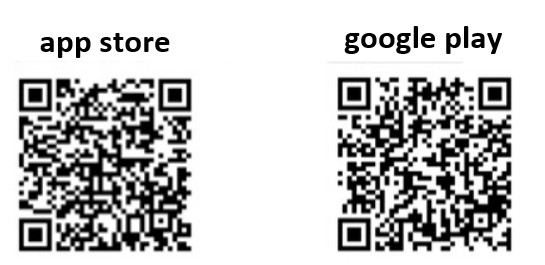
※For instructions on how to install, click here.
② On the Residence【住まい】 tab, select the Pre-existing Damage Report「入居時損傷箇所確認届」.
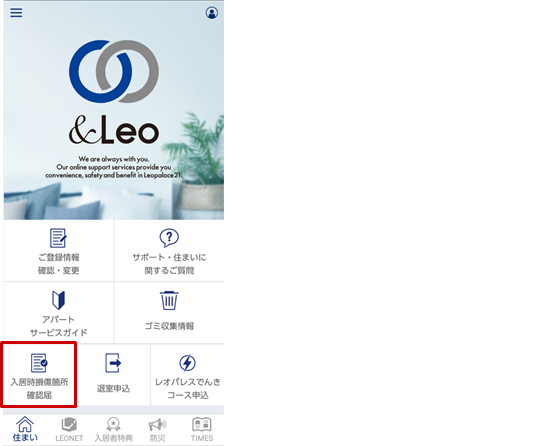
③ Attach a picture and the description of the damage you want to report and select Confirm the information of the submission 「入力確認内容を確認する」.
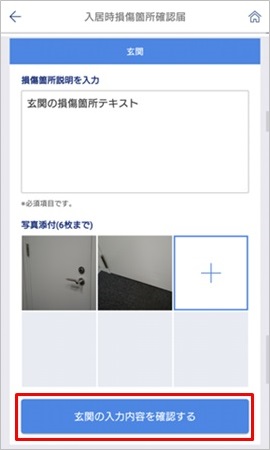
・Regarding the Damage description:
Write the description of the damage or stain, the place and condition. ※Max of 512 characters.
・Attach a picture:
It's not obligatory. The maximum is 6 pictures per report.
*Take a Picture「写真を撮る」・・・ The camera will be activated and you can take the picture.
*Camera roll「カメラロール」・・・ You can attach pictures taken previously.
④ After confirming the content, select Submit「提出する」.
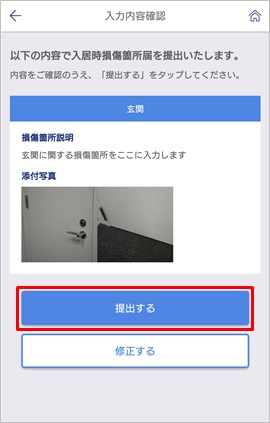
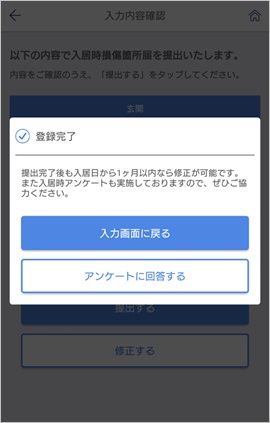
⑤ The confirmation screen will be displayed.
You can select Return to the Report Screen「入力画面に戻る」 and submit more reports.
※ You can edit or make new reports, as long as it?is within the submission period.
※Those who can not use a smartphone (iPhone, Android), or if you live in an apartment/have an contract that does not support the LEONET system, please file a written report submission.
※For the written report submission, please post or hand in person to one of the LeoPalace Centers.
※For the postage of the written report submission, please stamp a 110¥ seal and send it to the Supervision Center responsible of your building. (In case you are not sure which one is the supervision center of your building, send it to the closest management office of your area.)