

Common questions and problems regarding the Television.
Common questions and problems regarding the Television.
Before requesting a maintenance or repair, check the instructions below regarding common inquiries and problems for televisions and related devices.
※Also check the Instruction Manual provided in the room for specific information.
Please, click here if you could not find the instruction manual
※Click on the desired subject below to jump to the contents.
※Click on the desired subject below to jump to the contents.
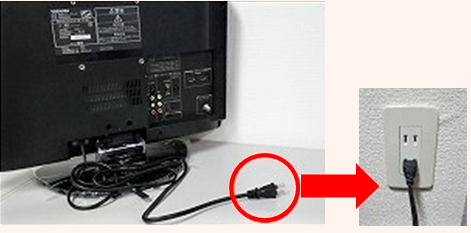
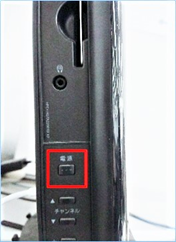
Check if the power cord is unplugged.
| Manufacturer | Link |
|---|---|
| 東芝(Toshiba) | Manual search |
| シャープ(Sharp) | Manual search |
| パナソニック(Panasonic) | Manual search |
| ウインコド(WINCOD) | LIMLIGHT Manual search |
| ユニッテク(Unitech) | Visole Manual search |
| ジェイテクノ(Jtechnos) | Manual search |
| AIWA | OVENICS Manual search |
| Hisense | Manual search |
| オリオン(Orion) | Manual search |
| 三菱(Mitsubishi) | Manual search |
| NEXXION | Manual search |
| ビクター(Victor) | Manual search |
| SONY | Manual search |
| DOSHISHA SANSUI OEN | Manual search (Instruction manual for past products) |
| 日立(HITACHI) | Manual search |
Is the start lamp of the terrestrial digital tuner lit in green or yellow?
Orange ・ Red ⇒ Power off
Green ・ Yellow ⇒ Power on
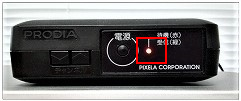
Power off … Orange ・ Red
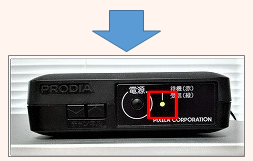
Power on … Green ・ Yellow
| Manufacturer | Link |
|---|---|
| 東芝(Toshiba) | Manual search |
| シャープ(Sharp) | Manual search |
| パナソニック(Panasonic) | Manual search |
| ウインコド(WINCOD) | LIMLIGHT Manual search |
| ユニッテク(Unitech) | Visole Manual search |
| ジェイテクノ(Jtechnos) | Manual search |
| AIWA | OVENICS Manual search |
| Hisense | Manual search |
| オリオン(Orion) | Manual search |
| 三菱(Mitsubishi) | Manual search |
| NEXXION | Manual search |
| ビクター(Victor) | Manual search |
| SONY | Manual search |
| DOSHISHA SANSUI OEN | Manual search (Instruction manual for past products) |
| 日立(HITACHI) | Manual search |
・ Common breaker in the building is tripped
If the lights outside of the building are off at night, the breaker for the breaker may be tripped.
・ Malfunction of the TV or terrestrial digital tuner
It may be improved after unplugging the power cable of the device from the outlet, and plugging it in again after 5 seconds.
・ Disruption due to bad weather
Due to strong winds and heavy rain, there may be temporary radio interference or some malfunction in the antenna.
※ We will check the site before repairing, so please inform us from the "Equipment Repair Request Form".
A channel scan is required after installation. Please refer to the Instruction manual of TV or the homepage of manufacturer, and try the channel setting.
In addition, the reception situation may deteriorate temporarily due to weather factors, so please wait for a while when there is a heavy rain or strong wind.
If the message is displayed frequently or some channels are not displayed, the reception status of the antenna may be poor or the device may be out of order. Also, if you cannot watch Leonet or all TV channels, there may be a problem in the entire property, so please inform us from "Equipment Repair Request Form".
Instruction manual
・ If you cannot find the instruction manual provided in your room, you can download it from the manufacturer's homepage. Please click an "Manual" link from the following manufacturer to check.
・ Typical manufacturers are listed as below, but please check the manufacturer and model number and inform us from "Inquiry form" if you cannot find from the list.
※Old product may not be prepared.
| Manufacturer | Link |
|---|---|
| 東芝(Toshiba) | Manual search |
| シャープ(Sharp) | Manual search |
| パナソニック(Panasonic) | Manual search |
| ウインコド(WINCOD) | LIMLIGHT Manual search |
| ユニッテク(Unitech) | Visole Manual search |
| ジェイテクノ(Jtechnos) | Manual search |
| AIWA | OVENICS Manual search |
| Hisense | Manual search |
| オリオン(Orion) | Manual search |
| 三菱(Mitsubishi) | Manual search |
| NEXXION | Manual search |
| ビクター(Victor) | Manual search |
| SONY | Manual search |
| DOSHISHA SANSUI OEN | Manual search (Instruction manual for past products) |
| 日立(HITACHI) | Manual search |
The TV may be in analog broadcast reception status.
Please check the following items according to the type of TV installed.
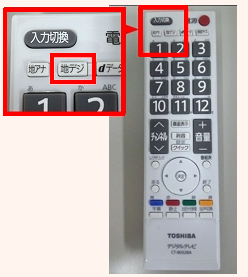
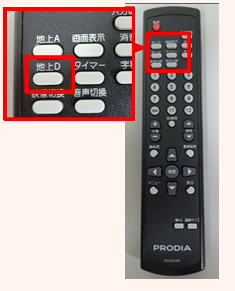
Switch the TV screen to the "Video 1(ビデオ1)" or "External input(外部入力)" screen with the remote control.
※Please check the TV is connected with a three-color cable(red, white, yellow), and the power of terrestrial digital tuner is on.
Please check here for how to connect.
Please check the following.
・ Is the TV volume set low or is it muted?
・ If there is a terrestrial digital tuner in the room, please check the TV and terrestrial digital tuner are properly connected. Check here
・ If there is no sound from the recording device, check the audio connection is correct.
※If a three-color cable is connected, please check the white and red cables are connected correctly.
If there is no improvement, please inform us from "Equipment Repair Request Form".
If there are no problems with antenna wire or channel reception settings, there may be a problem with the TV or speakers.
After checking the situation, we will arrange replacement etc., so please inform us from "Equipment Repair Request Form".
We will arrange the replacement or repair, please inform us about the reason of damage, and situation from "Equipment Repair Request Form".
Please note that it will take about one week after ordering to deliver the product.
※For damage due to customer's intention or negligence, repair cost may be incurred.
Monthly contract customers(Monthly plan, short-term plan, student discount plan)
Customers who have subscribed to "Tenant comprehensive service & key safety system" with monthly contract, we will repair or replace free of charge if you accidently damage or break down your furniture or home appliances. (If you have any questions, please check when you contact us.)
・ If you cannot find the instruction manual provided in your room, you can download it from the manufacturer's homepage. Please click an "Manual" link from the following manufacturer to check.
・ Typical manufacturers are listed as below, but please check the manufacturer and model number and inform us from "Inquiry form" if you cannot find from the list.
※Old product may not be prepared.
| Manufacturer | Link |
|---|---|
| 東芝(Toshiba) | Manual search |
| シャープ(Sharp) | Manual search |
| パナソニック(Panasonic) | Manual search |
| ウインコド(WINCOD) | LIMLIGHT Manual search |
| ユニッテク(Unitech) | Visole Manual search |
| ジェイテクノ(Jtechnos) | Manual search |
| AIWA | OVENICS Manual search |
| Hisense | Manual search |
| オリオン(Orion) | Manual search |
| 三菱(Mitsubishi) | Manual search |
| NEXXION | Manual search |
| ビクター(Victor) | Manual search |
| SONY | Manual search |
| DOSHISHA SANSUI OEN | Manual search (Instruction manual for past products) |
| 日立(HITACHI) | Manual search |
If you cannot connect your devices such as recording device or game console due to insufficient input terminals, AV devices called AV Selector that can add input terminals are available.
Customers are requested to prepare AV selector equipment etc.
※Since the AV selector differs depending on the type of cable, please be careful to prepare a selector that matches the cable used.
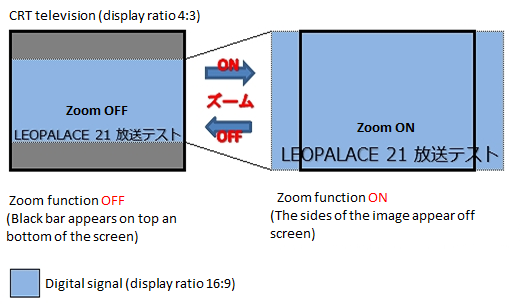
Please try👇
****It depends on the manufacturer of terrestrial digital tuner installed in the room, but the zoom function may be enabled, so please try to turn off the zoom function.
※Button on the remote control of tuner is "ズーム"(zoom), "画面サイズ"(display size), "画面モード" (screen mode) etc.
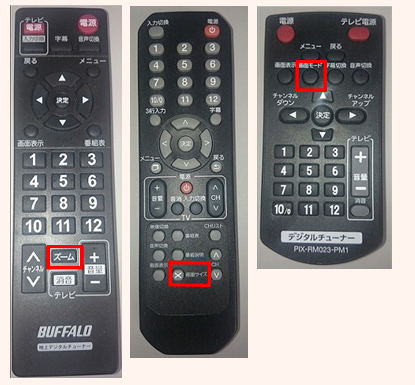
If the screen size does not change, the connected TV setting may be set to "ワイドテレビ"(Wide TV), so please check the setting with the menu button.
If there is no improvement, please inform us from "Equipment Repair Request Form".
If the PlayStation3 is connected to an TV with an HDMI cable, the detection signal on the TV side and the Sony PlayStation3 (PS-3) signal may not match.
Improvement method
-
Unplug the power cable from the outlet
-
If the AV cord(3-color cable) is connected, disconnect it from the TV and game console.
-
Connect the HDMI cord to the TV and game console
-
Plug the power cable in the outlet
-
Set TV input switching to HDMI
-
Press the power button on the main unit for 5 seconds or more (until the second beep sounds)
-
When the "HDMI信号が検出されました" message is displayed in the screen, select "はい".
-
"最適な解像度にします" message will display and select "はい".
-
The TV screen is displayed.
※ If there is no improvement, please check with the manufacturer for details.
The antenna installed on the roof is for "CS broadcasting" which is one of Leonet service.
※It cannot receive the BS broadcasts of NHK(satellite broadcasts) or general CS broadcasts.
After reading the following notes, the resident can directly consult with the service provider or apply, and the resident can install it at the expense of the resident.
Precautions for antenna installation
・ Antennas can only be installed on the balcony or flower box of your room. Please do not make scratches or hole in the building. (Please refrain from screwing)
・ Please refrain from installing in common areas (railings in corridors, roofs etc.)
We recommend that you check the installation environment such as reception status of radio waves in advance.
・ We may refuse an installation work that may spoil the appearance of the building or may cause inconvenience to other rooms.
・ Please note that some TVs installed in Leopalace do not have a built-in BS tuner.
・ Please be sure to remove the installed dish antenna and other equipment and wiring when you move out.
Watching contract
Regarding the use of pay channel services such as satellite broadcasting and cable TV, customers are requested to consult directly with the service provider and apply.
Please inform us from "Inquiry form" if you have any question.
In Tokyo and the area around Tokyo(mainly within a radius of 50km from Tokyo Sky Tree), it may be able to receive the TOKYO MX broadcast frequency, but the reception status will vary depending on the location conditions of each property.
Please check👇
・ Please note that if you can watch commercial channels but not only TOKYO MX, it may not be able to receive in the property.
In particular, radio waves may not be received depending on the area where you live, such as Chiba, Saitama, and Kanagawa prefectures.
・ You may be able to watch by resetting the TV or recording device, so please try rescanning the channel settings (Instruction manual).
Please note that we may not be able to respond to poor reception due to changes in the surrounding location.
Depending on the reception status of the antenna, you may be able to watch an local broadcaster in the area, but the reception status will vary depending on the location conditions of each property.
▼Major local broadcasting station
とちぎテレビ(Tochigi TV)/群馬テレビ(Gunma TV)/テレビ埼玉(TV Saitama)/千葉テレビ放送(Chiba TV broadcast)/東京MX(Tokyo MX)/テレビ神奈川(TV Kanagawa)/岐阜放送(Gifu broadcast)/三重テレビ放送(Mie TV broadcast)/びわ湖放送(Biwa-lake broadcast)/京都放送(Kyoto broadcast)/サンテレビジョン(San Television)/奈良テレビ放送(Nara TV broadcast)/テレビ和歌山(TV Wakayama)
※ Please note that if you can watch commercial channels but not only local broadcasters, it may cannot receive in the property.
※You may be able to watch by resetting the TV or recording device, so please try rescanning the channel settings(Instruction manual).
If you cannot watch the commercial broadcast stations such as NHK(Nihon TV, TBS, Fuji TV, TV Asahi) and network stations, there may be a problem with antenna etc., so please inform us from "Inquiry Form".
In case of malfunction such as some buttons not working, or if you lose the remote control, we will deliver a new remote control. Please check the TV's manufacturer and model number, and inform us from "Equipment Repair Request Form".
※ Please note that it may take about one week for the product to be delivered after the order is placed.
※ If you lose it due to your intention or negligence, you may be required to pay the replacement fee.
You can operate it by setting the remote control of the terrestrial digital tuner.
The setting method of terrestrial digital tuner is different depending on the manufacturer and model, but it is necessary to register the setting number assigned to each TV manufacturer.
Please check the registration method and setting number in the instruction manual of the terrestrial digital tuner installed in the room before registering.
Please connect by following the steps below
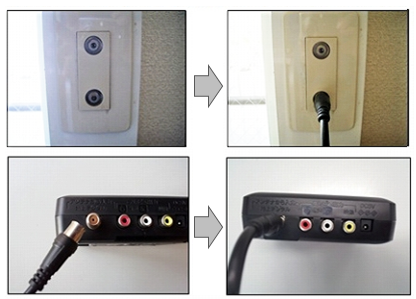
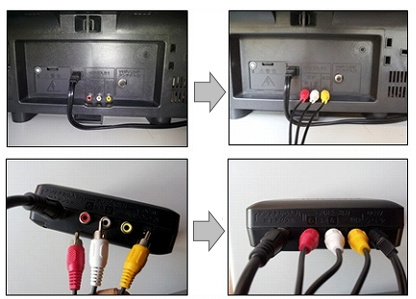
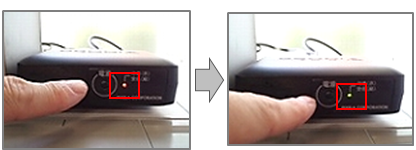
4. It will be astatic when you turn on the TV, so please switch the input to "ビデオ1" or "外部入力" with the input switching button(入力切替) on the remote control.
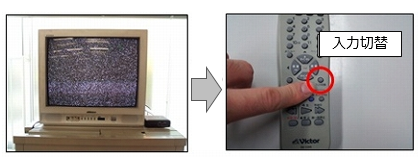
If there is no improvement, please inform us from "Equipment Repair Request Form".
Is the power of terrestrial digital tuner on?
Orange ・ Red ⇒ Power Off
Green ・ Yellow ⇒ Power On
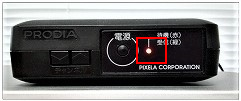
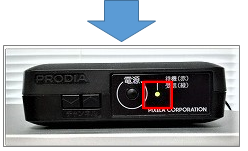
Is the remote control operated toward the terrestrial digital tuner?
It may not respond when it is pointed at the TV.
If the remote control has code switching, is it set to "1"?
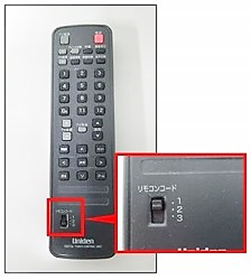
Is the remote control battery dead?
If it is out of battery, please try removing the battery in the remote control and replacing it with a new one.
※Please do not mix new and old batteries or different type of batteries.**※Make sure that the polarity (+-) of the battery is correct.
Since the remote control batteries of the equipment (air conditioner, TV, tuner etc.) are consumable, the resident is requested to replace them while living.
How to check the operation of the remote control
■ You can check the remote control by the following method
1. Look at the transmitter at the tip of the remote control through a lens of a mobile phone camera etc.
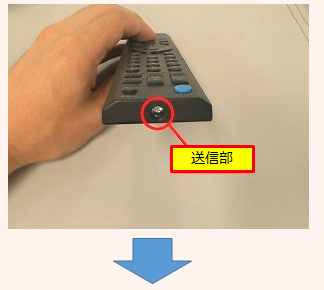
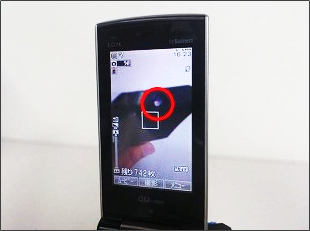
・ The light flashes
The remote control is working properly.
There may be a malfunction on the main unit, so please check it.
・ The light does not flash
The remote control battery is dead, or the remote control is broken.
※※Since this method utilizes a characteristic of CCD and CMOS sensors used in digital camera, it may not be supported in some models.
We will deliver a new remote control if it is necessary to be replaced, so please check the manufacturer and model number of the terrestrial digital tuner, and inform us from "Equipment Repair Request Form".
・ Please kindly understand that it may take about one week to deliver the product after the order is placed.
・ If you lose it due to your intention or negligence, you may be required to pay the replacement fee.
Please check the power cable is connected
When you turn on the power of the terrestrial digital tuner, the green light will be on.
In addition, it may be improved by unplugging the power cable of the device from the outlet and plugging it in again.
Please refer to here for how to connect the terrestrial digital tuner.
If there is no improvement, please inform us from "Equipment Repair Request Form".
・ Please check the TV and terrestrial digital tuner are connected properly.
・ It may be improved if you unplug the power cable of the device from the outlet, and plug back it in.
・ If there is a static in the screen, switch the screen to "ビデオ1"(Video 1) or "外部入力"(External input) with the button on the remote control.
・ Some CRT TVs have AV cable(three-color cable) terminals on the front and back of the TV, but only one of the works.
■Product(サンヨー(SANYO) C20D10 / C20D20)
If you connect an AV cable(three-color cable) to both the front and rear, the terminal connected to the front has priority.
If the AV cable(three-color cable) is connected to the rear terminal, disconnect the front terminal or reconnect the tuner AV cable (three-color cable) to the front of the TV.
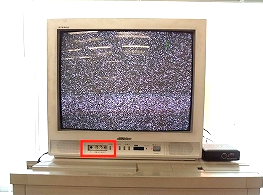
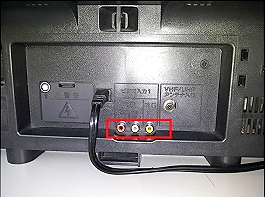
There are AV cable terminals on the front and back of the TV.
If the front is used, the back will be unusable.
For the terrestrial digital tuner connection, please refer to ”The message "電波が受信できません" (No signal) is being displayed on the screen.”.
※If there is no improvement, please inform us from "Equipment Repair Request Form".