

How to apply for moving out of the room (End the contract).
How to apply for moving out of the room (End the contract).
※Remember to apply the prior notice at least one month before moving out to avoid extra rent charges. Click here for the details.
You can apply the prior notice online or with the LEONET device installed in the room.
※Applications through e-mail or telephone are not accepted.
■ Individual contracts:
Click here for general information on moving out after the application of the notice.
■ Corporate (Company) contracts:
Click here for general information on moving out after the notice is filed by the company.
Click on the desired subject below to check the details:
※To register the application online, you will need to have registered your LEONET ID and password.
・If you already created your LEONET ID・Password but forgot it, click here.
・If you still have not created your LEONET ID・Password, click here.
【 Application instructions: 】
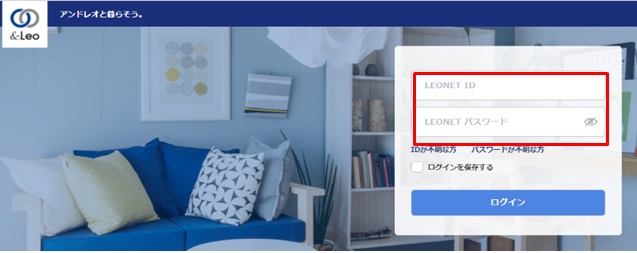
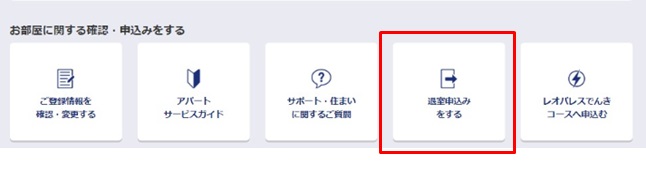
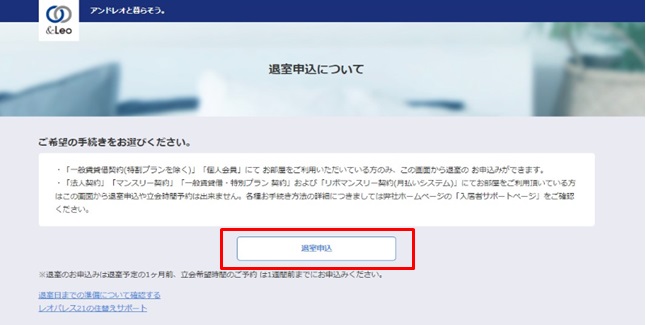
① Enter your LEONET ID and password to log in to the tenants exclusive Web site「&Leo」.
Important notes regarding the application:
・ The rent will be charged accordingly, for each day of the month, until the last day of the contract.
・ Depending on the contract type and how long you are using it, there can be penalties for ending the contract too early.
・ Customers who use the [Resona payment service] and pay the rent by account debit every 3rd day of the month (depending on the bank business day), the rent may be debited of your account even after applying or moving out of the room.
In this case, the overpaid amounts will be use to liquidate the other fees calculated on the final payment, such as the cleaning and repair fees. The tenant will then pay the difference after the subtraction or receive the refund if it surpassed the required amount.
For additional questions, contact a Leopalace Office nearby or file an inquiry through the [Inquiry Form].
・ The move out application are only available for customers renting through standard Chintai rental contracts or the membership rental contracts.
Note that this method is not available for those who are using the room through a Corporate (company) contract or the monthly rental system and fixed-term lease.
・ The date the application was sent to the LEONET system will be considered the application date. This application information will be displayed in the system by the following date.
・ You are not allowed to enter move out dates that are less than 20 days from the day your are applying.
If you are in a hurry to move out, file the application through mail or in a LeoPalace branch.
・ You can only apply online for the move out once per LEONET ID account.
If you cancelled the application after an application even once and will be applying again, you will need to send a form by mail or by visiting a LeoPalace branch.
※The end of the room contract application will have to be registered with the "Corporate WEB system". For additional questions, please contact the branch or department in charge of the company's contract.
Regarding the 『Corporate WEB system』
Leopalace21 uses the corporate website "Houjin (Corporate) WEB System" for improving services with their corporate business partners.
By registering in the system, the following procedures and information are available on the web site.
・ Checking the 「Billing details」 and 「Print out invoices」 of each month.
・ Confirming/Printing/Saving the room contract cancellation report.
・ Apply for the room contract cancellation.
Consider registering the web system as it improves the convenience in the use of our services.
※There is no charge for using the web system.
Please, access the dedicated site (https://leo-hojinweb.leopalace21.com/meisai/initiate/) to start using. The registration is required to use.
For additional questions, please contact the branch or department in charge of the contract.
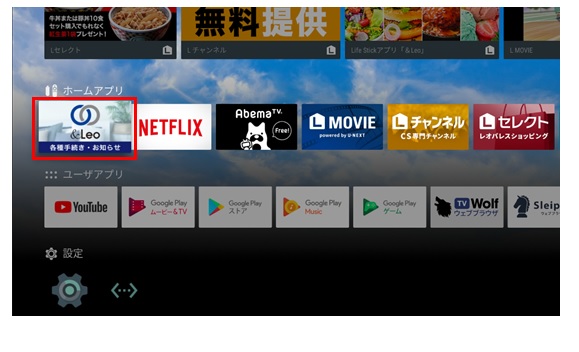
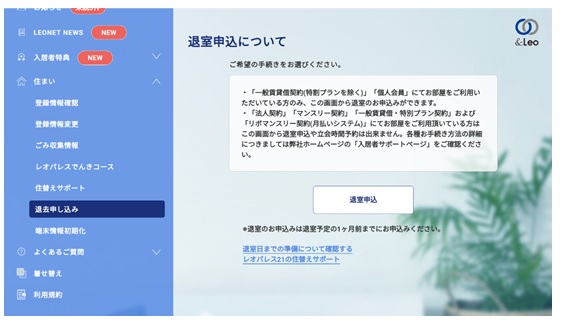
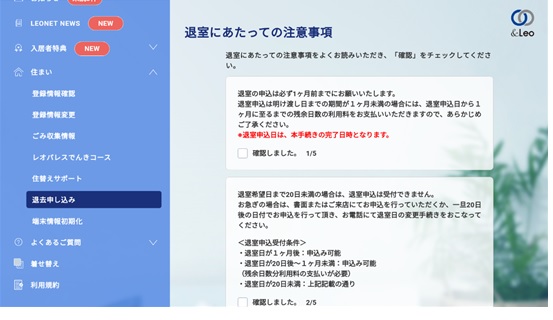
To apply for the moving out, access the "&Leo procedures / notifications"「&Leo 各種手続き・お知らせ」 smartTV app on the home screen of the device installed in your Television.
【 Move out application procedure 】
① Select「&Leo 各種手続き・お知らせ」(&Leo procedures & notifications) on the home screen.
Important notes regarding the application:
・ The rent will be charged accordingly for each day of the month, until the last day of the contract.
・ Depending on the contract type and how long you are using it, there will be penalties for ending the contract too early.
・ Customers who use the [Resona payment service] and pay the rent by account debit every 3rd day of the month (depending on the bank business day), the rent may be debited of your account even after applying or moving out of the room.
In this case, the overpaid amounts will be use to liquidate the other fees calculated on the final payment, such as the cleaning and repair fees. The tenant will then pay the difference after the subtraction or receive the refund if it surpassed the required amount.
For additional questions, file an inquiry through the [Inquiry Form].
・ The move out application are only available for customers renting through standard Chintai rental contracts or the membership rental contracts.
Note that this method is not available for those who are using the room through a Corporate (company) contract or the monthly rental system and fixed-term lease.
・ The date the application was sent to the LEONET system will be considered the application date. This application information will be displayed in the system by the following date.
・ You are not allowed to enter move out dates that are less than 20 days from the day your are applying.
If you are in a hurry to move out, file the application through mail or in a LeoPalace branch.
・ You can only apply online for the move out once per LEONET ID.
If you cancelled the application once and wish to apply again, you will need to send a form by mail or by visiting a LeoPalace branch.
・ To perform the login to apply, you will a Leonet ID/Password.
Those who do not know their ID/Password, check here.
If you have a smartphone(iPhone, Android), you can apply from the "&Leo" app.
※Those who still not have the 「&Leo」 app installed, check here.
【 Move out application procedure 】
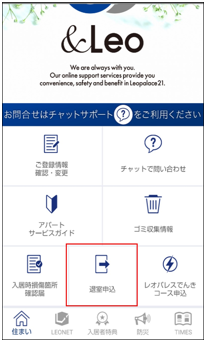
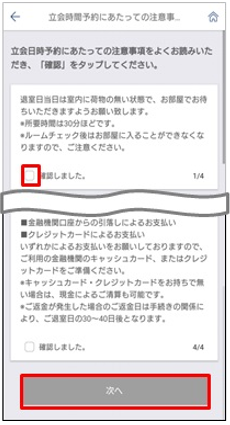
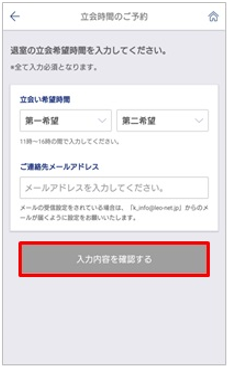
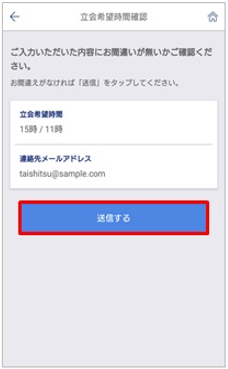
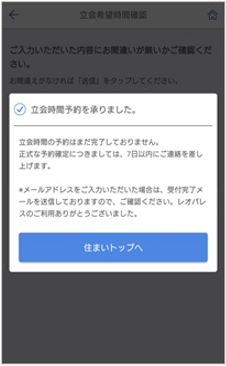
① Log in from the "&Leo" App, and select "Move-out notification" from "Residence" tab.
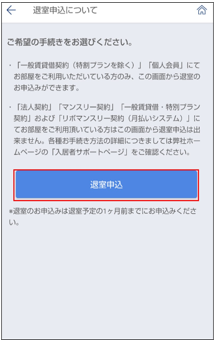
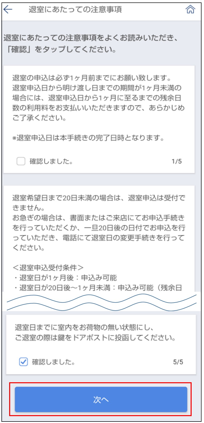
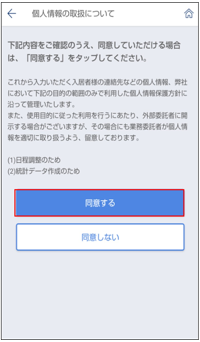
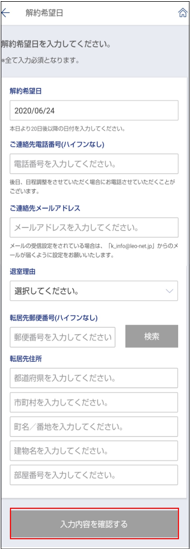
⑤ Enter the desired move-out date, and select "Check your entry".
・Enter the desired cancelation date, phone number and e-mail address contact then the reason for the moving out.
※New address and post code are required.
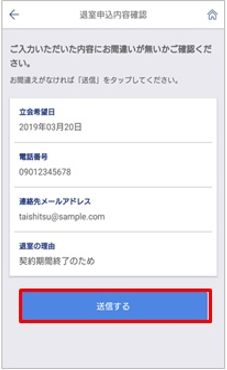
Important notes regarding the application:
・ The rent will be charged accordingly for each day of the month, until the last day of the contract.
・ Depending on the contract type and how long you are using it, there will be penalties for ending the contract too early.
・ Customers who use the [Resona payment service] and pay the rent by account debit every 3rd day of the month (depending on the bank business day), the rent may be debited of your account even after applying or moving out of the room.
In this case, the overpaid amounts will be use to liquidate the other fees calculated on the final payment, such as the cleaning and repair fees. The tenant will then pay the difference after the subtraction or receive the refund if it surpassed the required amount.
For additional questions, contact a Leopalace Office nearby or file an inquiry through the [Inquiry Form].
・ The move out application are only available for customers renting through standard Chintai rental contracts or the membership rental contracts.
Note that this method is not available for those who are using the room through a Corporate (company) contract or the monthly rental system and fixed-term lease.
・ The date the application was sent to the LEONET system will be considered the application date. This application information will be displayed in the system by the following date.
・ You are not allowed to enter move out dates that are less than 20 days from the day your are applying.
If you are in a hurry to move out, file the application through mail or in a LeoPalace branch.
・ You can only apply online for the move out once per LEONET ID.
If you cancelled the application once and wish to apply again, you will need to send a form by mail or by visiting a LeoPalace branch.
・ To perform the login to apply, you will a Leonet ID/Password.
Those who do not know their ID/Password, check here.
Tenants that does not have a LEONET device available in the building or can not use the Internet may apply using the moving out application document below.
You can also apply in the nearest Leopalace Center with the document by bringing your family stamp (hanko) and a identification document.
【 Application procedure 】
1. Use the "Moving Out Notice"「退室通知書」given along the contract documents or print the attached pdf file below.
Moving out notice: 退室通知書.pdf Download
※If you are not able to print the document, write down all the information on the notice and fill in the needed information.
※The date stamped by the post office will be considered the date of the notice registration.
2. Please check the following and fill in the form.
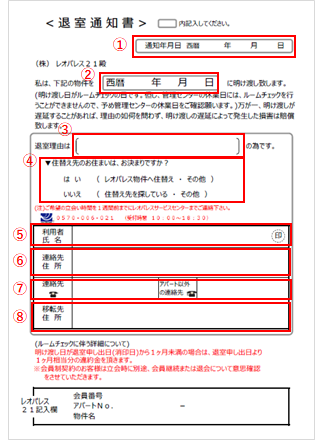
① Write the date you are filling the information.
(The date registered in the system will be the date stamp from the post office.)
② Write the date you will vacate the room.
・ Room Inspection: Will be performed in the last day in the room.
・ If the inspection not required: The inspection will be performed in a later date. ※
③ Write down the reason for moving out the room.
Simple answer. Ex: Return to home country, marriage, new employment etc.
④ Mark if you have already decided where you are moving to.
Write a circle "〇" around the answers between either ( ).
⑤ Write the name of contractor and the family seal stamp (hanko).
⑥ Write the current apartment address you are moving from.
⑦ Write down your contact number(s).
⑧ Write the address you are moving to. (You do not need to fill in if you have not decided yet.)
※ If the room inspection will be performed, please contact us in a later date through our [Inquiry Form] to check the report.
※ If the room inspection will be needed, please contact us at least one week in advance to schedule the room inspection time on the last day in the apartment.
3. Fill in the required items and mail or bring to the nearest LeoPalace branch.
※Besides the written notice, you can also apply online or on the LEONET device in the buildings that have the LEONET services.
Important notes regarding the application:・ The rent will be charged accordingly for each day of the month, until the last day of the contract.
・ Depending on the contract type and how long you are using it, there will be penalties for ending the contract too early.
・ Customers who use the [Resona payment service] and pay the rent by account debit every 3rd day of the month (depending on the bank business day), the rent may be debited of your account even after applying or moving out of the room.
In this case, the overpaid amounts will be use to liquidate the other fees calculated on the final payment, such as the cleaning and repair fees. The tenant will then pay the difference after the subtraction or receive the refund if it surpassed the required amount.
For additional questions, contact the branch responsible for your contract or file an inquiry through the [[Inquiry Form](https://www.leopalace21.com/en/inquiry/life/input)].
The proxy can use the attached file below as the letter of proxy (PoA) along a copy of the contractor and the proxy's identification document to be able to perform the inspection when ending the contract.
If you do not have a printer, write down the items contained in the document and file the information.
File
・ 委任状.pdf (79.23 KB) (Letter of proxy - PoA)